


Conditions for the availability of the chat functionality with the patient
The cost of a chat with a doctor for a patient
How to send an invitation to a chat
- through the block of nearby entries on the schedule page
- through the list of all patients
- by adding a new patient
- via «Детали записи»in the schedule
Notifications to the patient about the chat invitation
After an in-person appointment or an online consultation, the patient can be invited to the chat to stay in touch with him to clarify the information after the appointment.
After you have sent the patient an invitation to the chat, he needs to choose a time limit for using the chat.: it can be 3, 7 or 14 days. After selecting the chat usage period, the patient must pay for access.
The chat will display the chat availability period, and you can have a conversation with the patient during this time.
Check the app update.
The ability to communicate in chat rooms is a new feature. Make sure that you have the latest version of the app installed. Update it via the App Store (for iOS) or Google Play (for Android). Don't forget to turn on notifications so you don't miss messages from the patient.
Important! If you do not have a valid medical license, the patient will not be able to accept an invitation to a chat or pay for an online consultation through the application. This is a temporary technical issue that will be fixed soon.
Conditions for the availability of the chat functionality with the patient: 
- An active online consultation agreement with the type«Информационные».
The clinic must have a valid online consultation agreement with MedRoket with the type of consultations«Информационные». - Integration is enabled.
Integration must be activated in the clinic's personal account in «Сопровождение после приема»the Medflex system. - Access has been granted to specific doctors of the clinic.
The head of the clinic sets up access to the functionality for each doctor through the integration settings in the personal account of Medflex.
The cost of a chat with a doctor for a patient
The cost of the chat is calculated as a percentage of the cost of the initial reception indicated on the websiteProDoctorov.
- 3 days - 30% of the cost of the initial admission.
- 7 days - 50% of the cost of the initial admission.
- 14 days - 80% of the cost of the initial admission.
The cost of the chat if the price of the initial doctor's appointment is less than 1,000 rubles:
- 3 days - 300 rubles.
- 7 days - 500 rubles.
- 14 days - 800 rubles.
Important! After the patient pays for the escort after the appointment, the funds are transferred to the current account of MedRoket. Once a month, from the 5th to the 10th, funds for all paid escorts after admission last month, minus the 10% commission, are transferred to the clinic's checking account.
For more information, see the Medflex article«Сопровождение после приёма».
How to send an invitation to a chat
Important! One patient can be invited to the chat only 1 time.
There are 4 ways to invite a patient to a chat:
Through the block of the nearest entries on the page«Расписание»
To do this, in the current and upcoming appointments section, click on the button «Пригласить в чат»for the selected patient. The patient will receive a push notification about the invitation to the chat.

Through the list of all patients
The list of all patients shows the patients for yesterday and today from your schedule.
- Click «Все пациенты»in the nearest records section.

2. Select a patient from the list and press «Пригласить».
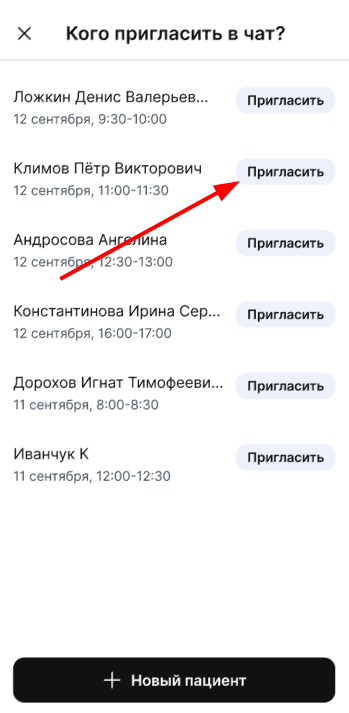
By adding a new patient
Adding a new patient is important if your schedule does not include any visits from this patient for the current and previous day.
- Go to the list of patients in the section «Чаты».

2. Click «+ Новый пациент».

3. Enter the patient's phone number.
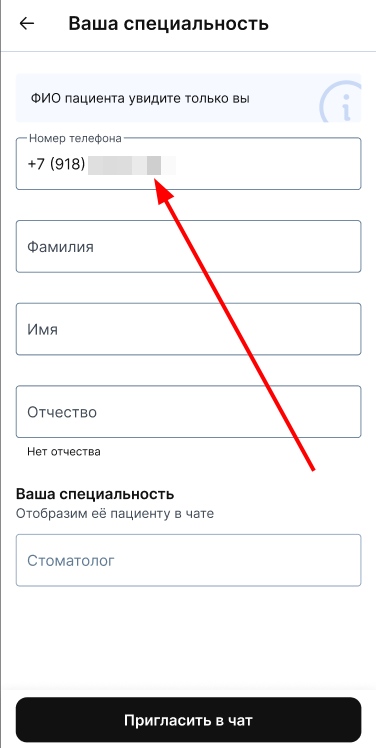
4. Enter any of the fields: first name, last name or patronymic of the patient.

5. Change the specialty if necessary.


6. Click «Пригласить в чат».

Via «Детали записи»in the schedule
- Click on the schedule entry.
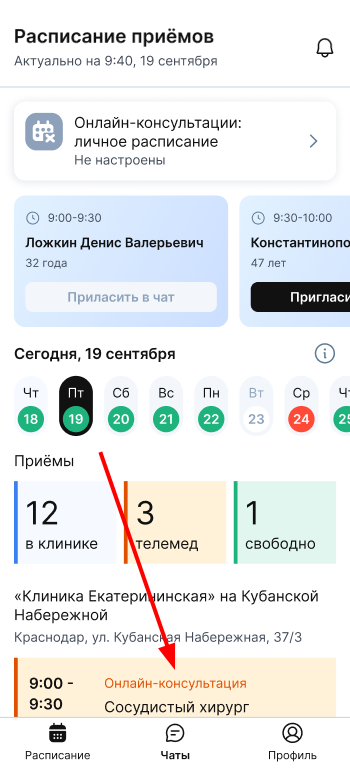
You will see the details of the selected entry.
2. Press the button«Пригласить в чат».

You can view all the sent invitations that have not yet been confirmed by the patient in the tab«Приглашения».

Important! Only the patient can extend access to the chat after the end of the paid period. To do this, the patient needs to enter a chat with you, select «Продлить доступ к чату»and pay for the selected period.
Notifications to the patient about the chat invitation
If the patient has the Medtochka app, they will receive a push notification that the doctor invites them to the chat.
The patient must accept the invitation.
After that, access to the chat will open and you can start writing messages.
We described in more detail in the instructions how the patient can accept the invitation and pay for the chat.

Important! If the patient does not have a medical device, you can send him an invitation to the chat, but he will not receive a notification.