


Video instruction for the patient «Как записаться и подключиться к онлайн-консультации».
In order to join the consultation:
1. Log in to the medical center via a computer or an application.
2. Be sure to confirm your email address in order to get a medical record.
3. On the main screen, select «Ближайшие записи»and tap on the desired one.
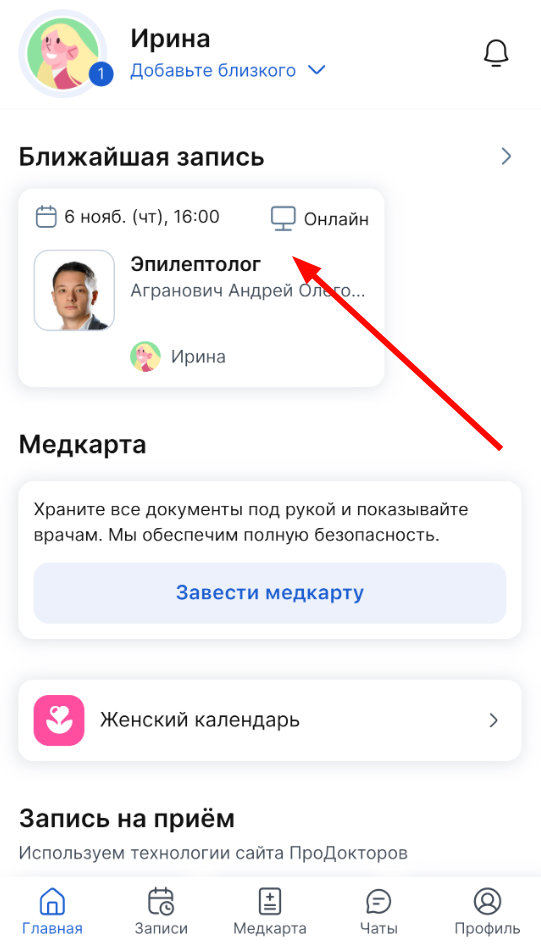
A page with detailed information about the recording opens.
4. Press the button«Начать консультацию». She will be available 5 minutes before the start of the consultation.

The consultation page opens. Wait for a specialist.

On this page, you can chat with a specialist.

5. To start a video call, tap «Связаться по видео»in the upper-left corner.

The video call can be interrupted, but the consultation will not end.

You can return to the video call at any time until the consultation is completed.
6. To end the consultation, click «Завершить»on the top right on the consultation page.
After that, the login to the consultation page will be unavailable. So make sure that you have resolved all issues with a specialist before completing.

If the doctor makes recommendations based on the results of the consultation, they will be sent to the medical center.
You can view them in your medical record.
Important! According to the order of the Ministry of Health dated 04/11/2025 No. 193n, within the framework of an online consultation, a doctor cannot diagnose, prescribe prescriptions and prescribe treatment. The doctor can only prepare recommendations based on the results of the consultation.