


1. Promo Codes
2. How to use a promo code
3. If you have not received a promo code for your feedback
Promo codes 
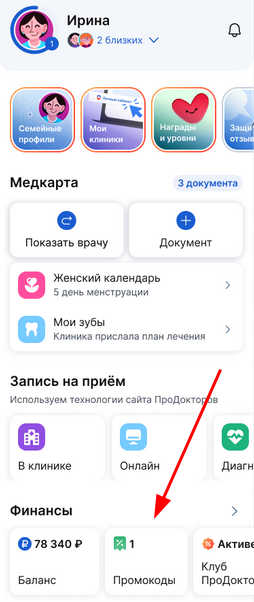
Discount coupons are displayed on the main page in the section «Финансы»in the block«Промокоды». They are given to the clinic that you have reviewed.
To view promo codes:
1. Click «Промокоды»on the main page.
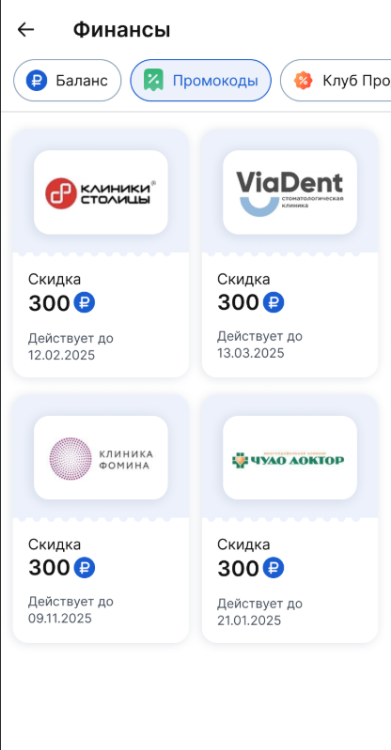
2. «Промокоды»You will see all available promo codes on the page.
How to use a promo code
- Show the promo code to the clinic administrator.
- Receive the letter by e-mail.
- Tell this code to the administrator to activate the discount.
If you haven't received a promo code for your review
Promo codes are issued as part of the program«Сила отзыва». You may have left a review in the wrong form.
To participate in the program:
- Scan the QR code or follow the link from the clinic.
- Leave a review in the feedback form.
Where is the promo code sent to?:
- By e-mail, if the email is confirmed and duplicated
in a medical room.
If there is no email, it means it got into spam.
The promo code is displayed on the main page in the section «Финансы»in the Medtochka application. Even if the email has not been received, you can always find the promo code in the card. For more information, see the Patient's Finances article.
The promo code is valid for 1 year. If it has already been applied or expired, a message will be displayed «Промокод не найден»in the medical card.