


The opinion about the doctor/clinic has changed
I want to change the text of the review
I want to transfer the review to the doctor's/clinic's page
You can make changes to both the published review and the review that is under moderation.
To change the review, go to the review page, open the menu in the upper-right corner and select «Удалить отзыв».
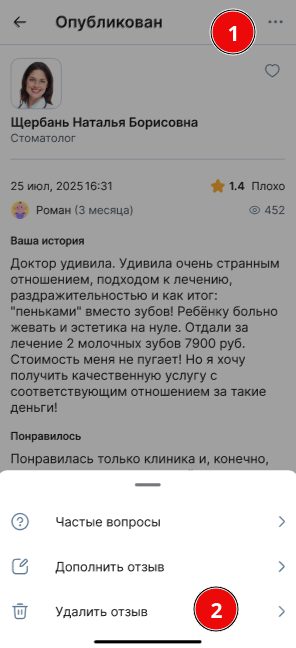
On the screen that opens, select the appropriate option and tap «Выбрать».
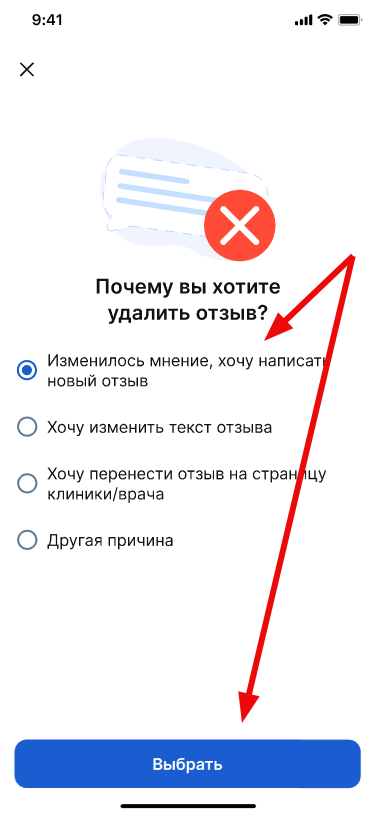
Options for changing the review 
1. The opinion of the doctor/clinic has changed
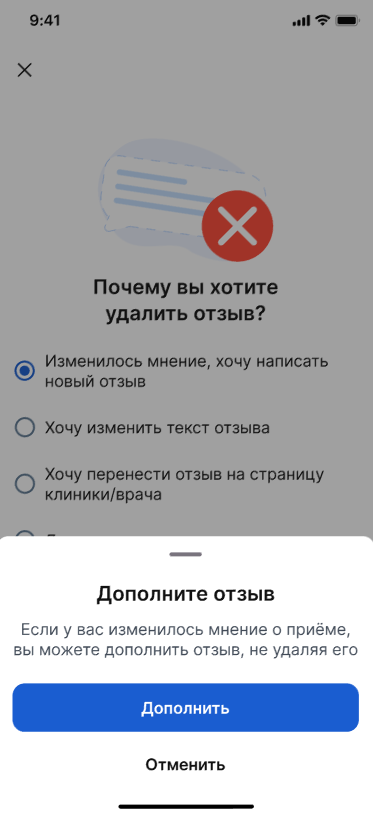
If you have already left a review about a doctor or clinic, but your opinion about the appointment has changed over time, you can supplement the existing review without deleting it.
To do this, select an item «Изменилось мнение, хочу написать новый отзыв»and click «Дополнить». A form opens on the website ProDoctorovto add the add-on.
Important! You can add a published review no more than 3 times and only from the same phone number that was used when it was created.
Read more about adding reviews in the article«Дополнить отзыв».
2. I want to change the text of the review
If you need to change the text of the review you sent, contact the review moderation department in any way possible.
The new version of the text will be reviewed and published after moderation.

3. I want to transfer the review to the doctor's/clinic's page
If you need to transfer a review from the doctor's page to the clinic's page or vice versa, contact the review moderation department in any way possible. Our specialists will transfer the review to the appropriate page.