A future entry from an insurance company
How to cancel an entry from an insurance company
If the insurance company has made an appointment with you at a clinic that works with a medical device, this entry will be displayed in the application, provided that this clinic is on the medical device.
A future entry from an insurance company 
To view the details of a future recording:
- On the main screen, go to «Ближайшие записи».
- Select the desired entry.
In the details of the recording, you will see:
- The date and time of the future appointment.
- Full name and specialty of the doctor.
- The address and phone number of the clinic.
- The cost of admission.
- The name of the insurance company.
From here, you can go to the section «Подготовка к приёму»to ask questions to the doctor or fill out a medical card.
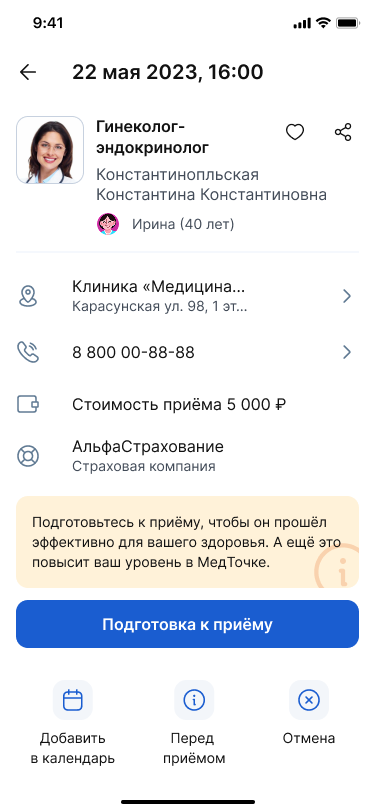
You can also cancel the recording here.
How to cancel an entry from an insurance company
To do this, tap «Отмена»at the bottom of the screen on the right and confirm the action.
Important! You cannot transfer an entry from the insurance company through the app. To transfer such an entry, contact your insurance company.
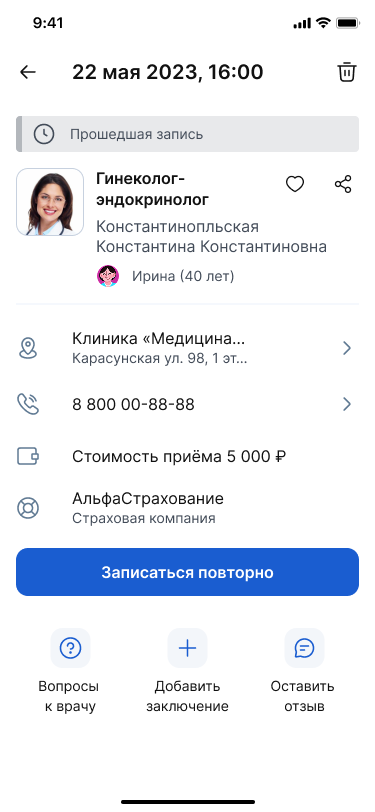
Last entry from the insurance company
In the details of the last appointment, it is possible to make an appointment again.
Please note that if you make a repeat appointment through the app, you will make an appointment for a paid appointment that is not covered by insurance.
Important! If you plan to re-enroll in the LCA, contact your insurance company.