


Setting up an appointment through the app
How to register a patient
Possible errors
You can register a patient through the web version or the Medtochka Doctor app. You can download it on Google Play, RuStore, and the App Store.
Setting up an appointment through the app 
- The clinic must enable integration «Запись через МедТочка Врач»in the medical complex.
To do this, you need a contract with Medflex and a positive amount on the balance. For more information, see the article How to enable integration with Medflex.
- In your personal account at Medflex, the clinic should enable you to record patients through the Medtochie Doctor app.
How to register a patient
After enabling integration, a button will appear in the schedule«Записать на приём».
- Select the desired day and click «Записать на приём».
- All available slots will be displayed in the window that opens. Select the appointment time and press «Далее».
You can select the time for today and 30 days ahead by switching between the dates using the arrows at the top of the screen.

- Select a specialty and click «Далее».
The cost and age restrictions of the patient are displayed for each specialty.
Your main specialty is selected by default.

- Enter the patient's details.
All fields except the patronymic are required.
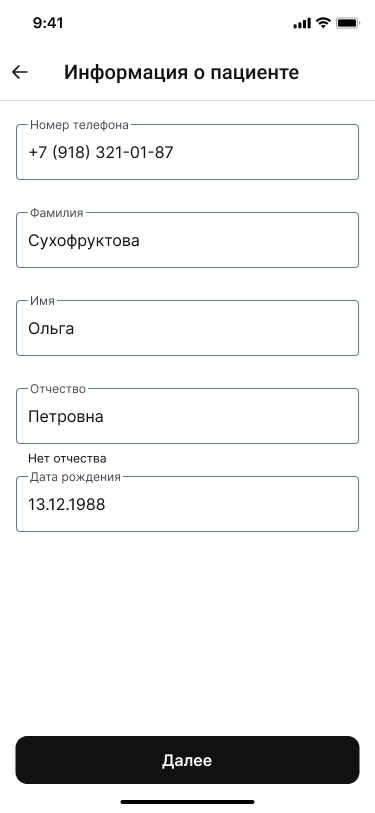
- Click«Далее».
If successful, you will see a corresponding notification.
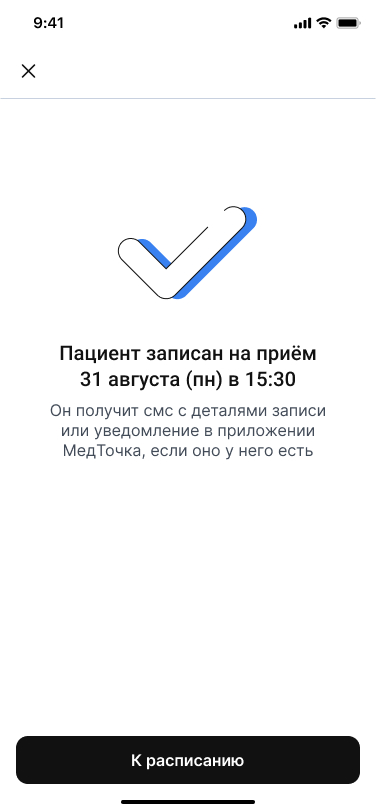
After creating an appointment, the patient receives a push notification in the Medtochka app about a future appointment.
Important! If the patient does not have a profile in the medical record yet, then when the doctor creates an entry for him, the system will automatically create a new profile for the patient. In such a profile, initially only the phone number will be indicated, the full name and date of birth will not be transferred to the profile of the patient.
To view the details of the appointment, the patient needs to specify in the application who will go to the appointment.
Possible errors
What could possibly go wrong:
- There is not enough money on the balance of the clinic in the Medical complex. Ask the administrator or supervisor to top up the balance.
- The clinic has already signed up another patient for the selected slot via MIS. Choose a new time for your patient.
- The doctor doesn't have access. It is necessary to check whether access to doctors is enabled.