


Disabling/enabling notifications
In the chat settings, you can disable or enable notifications from the selected chat and set up access to the doctor's medical record. To open the settings, click on the three dots.
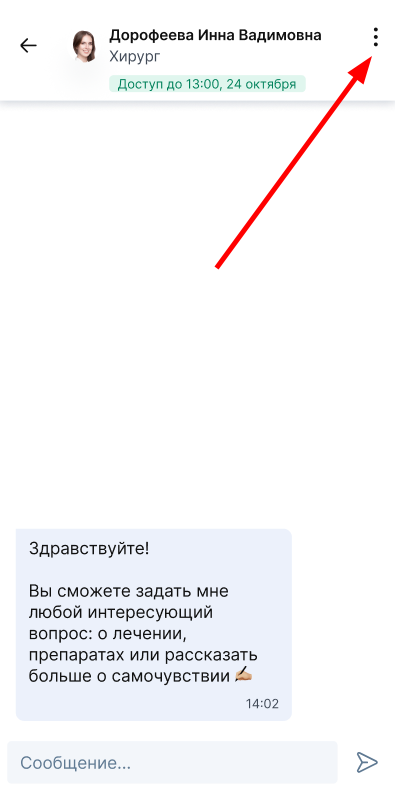
Disabling/enabling notifications 
Chat notifications are enabled automatically. To turn off notifications, click on «Отключить push-уведомления».
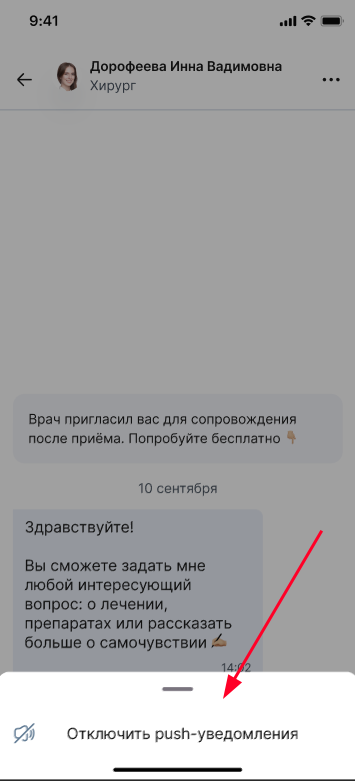
To enable notifications, click on «Включить push-уведомления».
Important! In order for you to receive notifications, you need to enable notifications from the app.
Possible errors
I can't write to the doctor in the chat
If you see a message«Врач больше не использует чат», it means that the clinic has blocked the doctor's access to the chat or stopped using the module«Чат пациента и врача», and you will not be able to write a message.

If you see the button«Продлить доступ к чату», it means that the access time to the chat has come to an end. You can extend access for another 3 days by clicking «Продлить доступ к чату».

The message was not sent
Check the Internet operation:
- Turn off the VPN if it is enabled.
- Turn it off «Авиарежим»if it's on.
If you use the mobile Internet
- If you have a second SIM card, try switching to it.
- Connect to Wi-Fi.
If you are connected to Wi-Fi
- Connect to another Wi-Fi network.
- Switch to the mobile Internet.
To send the message again, click on the button.

The invitation does not arrive
If you do not see an invitation to join a chat with a doctor, please follow these steps:
1. Check the app update.
The ability to communicate in chat rooms is a new feature. Make sure that you have the latest version of the app installed. Update it via the App Store (for iOS) or Google Play (for Android).
2. Check «Чаты»the or section«Сообщения».
After updating the app, log in to the app and find the new section«Чаты». The invitation and the chat itself will be there.
3. Check the notifications.
Go to the app Settings and make sure that you have chat notifications enabled. turn on notifications from the app. You can also find your invitation in the general chat list.

Expected updates
In February 2026, we will add the functionality of the Chat with the doctor: it will be possible to set up access to your medical record for the doctor.