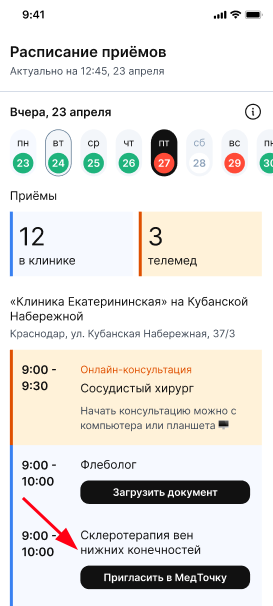


You can view: medical card, questionnaire, report on the women's calendar, documents and add your documents after admission via the mobile application and the web version (in the browser) of МедТочка Врач.
Under what conditions is the medical record view available?:
- When making an appointment for an online consultation
- If the patient in the medical room has opened access to view the medical records for the doctor
Viewing medical records 
In the app or in the web version
- Log in to the Doctor's Medical Center using your username (in the app or via the website)
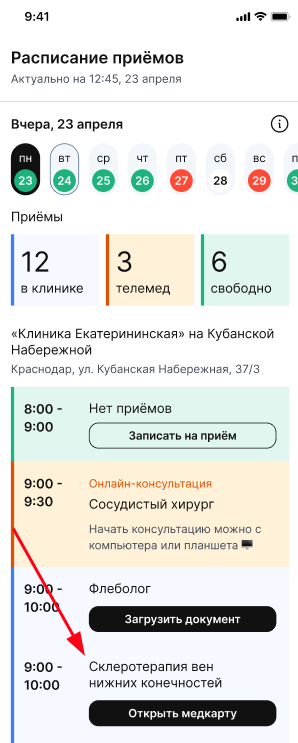
- Click on the "Открыть медкарту" button from the schedule.
On the page vrach.medtochka.ru
- Enter in the browser line mt.link
- Show the patient the QR code they need to scan.

Viewing medical records remotely
The patient should send you a link to view the medical card.
Follow the link and choose the option that suits you.:
- Enter the code that came with the link.
- Enter your username and password (the same as in your personal account ProDoctorov).
- Open the medical card.
Which documents are available for viewing
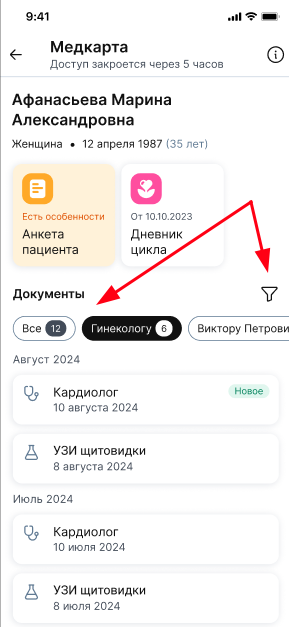
You can access the files and blocks (questionnaire/ women's calendar) in the medical record that the patient has granted access to view.
The patient can store documents in a general list, in a section «Все документы», or in separate folders (folder names are created by the patient himself). Also, for the convenience of working with the list of documents in the medical record, you can use a filter by type and year of the document.
Important! The medical record can be viewed within 12 hours from the moment of opening, unless the patient closes access before the end of this time. Provided that an appointment for an online consultation is made, the medical card will be available within 24 hours from the moment of opening.
If the patient does not have a medical card, you can send him an invitation by clicking the button «Пригласить в МедТочку». We will offer the patient to download a medical card and prepare a medical card.